BRIDGE LIVE Software v1.20.3
(Release Date 8/20/2026, zip archive)
Direct Link
To see all the new features added in BRIDGE LIVE Software v1.20.3, please review the release notes.
If your system is running v1.16.0 or newer and you want to roll back to v1.14 or older please contact customer support for assistance.
Related Product: BRIDGE LIVE
Download
BRIDGE LIVE Software v1.18.2
(Release Date 1/26/2026, zip archive)
Direct Link
To see all the new features added in BRIDGE LIVE Software v1.18.2, please review the release notes.
If your system is running v1.16.0 or newer and you want to roll back to v1.14 or older please contact customer support for assistance.
Related Product: BRIDGE LIVE
Download
BRIDGE LIVE Software v1.16.10
(Release Date 3/25/2025, zip archive)
Direct Link
BRIDGE LIVE Software v1.16.10 maintenance release. Please see the release notes for further information.
To see all the new features added in BRIDGE LIVE Software v1.16, please review the release notes to learn more about SRT Bonding Redundancy over Public Internet, Timecode Insertion in SEI (supplemental enhancement information), Dolby E Passthrough support, AAC-HE v1 and v2 encode and decode, and more!
If your system is running v1.16.0 or newer and you want to roll back to v1.14 or older please contact customer support for assistance.
Related Product: BRIDGE LIVE
Download
BRIDGE LIVE Software - pre v.1.16
(Release Date 1/14/2025)
Direct Link
If your system is running v1.16.0 or newer and you want to roll back to v1.14 or older please contact customer support for assistance
Related Product: BRIDGE LIVE
BRIDGE LIVE Software v1.16.5
(Release Date 1/14/2025, zip archive)
Direct Link
BRIDGE LIVE Software v1.16.5. Please see the release notes for further information.
To see all the new features added in BRIDGE LIVE Software v1.16, please review the release notes to learn more about SRT Bonding Redundancy over Public Internet, Timecode Insertion in SEI (supplemental enhancement information), Dolby E Passthrough support, AAC-HE v1 and v2 encode and decode, and more!
If your system is running v1.16.0 or newer and you want to roll back to v1.14 or older please contact customer support for assistance.
Related Product: BRIDGE LIVE
Download
BRIDGE LIVE Manual v1.20
(Release Date 9/2/2026)
BRIDGE LIVE Family Video Formats
(Release Date 3/31/2025)
Direct Link
BRIDGE LIVE Family Video Formats
Related Product: BRIDGE LIVE
Download
BRIDGE LIVE v1.16 REST API Documentation
(Release Date 9/6/2024)
Direct Link
BRIDGE LIVE v1.16 REST API Documentation
Related Product: BRIDGE LIVE
Download
BRIDGE LIVE Quick Start Guide Rev.D
(Release Date 3/23/2021)
Direct Link
BRIDGE LIVE Quick Start Guide Rev.D
Related Product: BRIDGE LIVE
Download
BRIDGE LIVE v1.16 New Features
Direct Link
Please watch this update video to learn about new features and capabilities in BRIDGE LIVE v.1.16.
You can also learn about the these new features and capabilities in BRIDGE LIVE Software v1.16, please review the release notes to learn more about SRT Bonding Redundancy over Public Internet, Timecode Insertion in SEI (supplemental enhancement information), Dolby E Passthrough support, AAC-HE v1 and v2 encode and decode, and more!
Related Product: BRIDGE LIVE
How do I login to BRIDGE LIVE when it first arrives from the factory?
Direct Link
Inside the box along with BRIDGE LIVE, power cables and rack rails will be a BRIDGE LIVE Quick Start Guide. This will contain unique passwords for login purposes.
Related Product: BRIDGE LIVE
How should I go about setting up BRIDGE LIVE?
Direct Link
Please see Chapter 8 of the BRIDGE LIVE Manual, “Initial System Setup and Configuration”.
Related Product: BRIDGE LIVE
The BRIDGE LIVE Quick Start Guide contains information about three different users; why?
Direct Link
Use the “admin” user to set up BRIDGE LIVE using the GUI. The “transcoder” user is used for command line interface administration. The "IPMI" user is for server management tasks such as remote restart or shutdown. However, the use of IPMI has security implications which are the responsibility of the customer to manage. See the BRIDGE LIVE Manual for more information.
Related Product: BRIDGE LIVE
Do remote browser users login with the same credentials as “admin”?
Direct Link
Yes. The same Username/Password is required to gain access to the GUI, whether locally (via Keyboard, Mouse, and Display Port Monitor) or remotely via the browser.
Note: Login to GUI (via “admin”), whether local or remote, is a different login to command line “transcoder” user.
Related Product: BRIDGE LIVE
How many “admins” can be logged in at any one time?
Direct Link
There is no practical limitation. The UI will report if two admins are changing the same pipeline at the same time.
Related Product: BRIDGE LIVE
Is a port number required when logging in as “admin” remotely, or just an IP address?
For the CENTOS admin environment, is invoking only possible from the local GUI?
Direct Link
Correct. The SSH is disabled by default and will need to be enabled via the GUI using the “admin” credentials.
Related Product: BRIDGE LIVE
What is the function of the IPMI user login?
Direct Link
IPMI is used to remotely reboot or shutdown BRIDGE LIVE. However, use of IPMI can introduce possible security implications for your network. AJA is not responsible for issues that arise from making use of the IPMI functionality. See the BRIDGE LIVE Manual for further details.
Related Product: BRIDGE LIVE
Is it possible to remotely reboot BRIDGE LIVE?
Direct Link
You can remotely reboot BRIDGE LIVE by using SSH connection to issue the "reboot" command with escalated rights, by using REST commands, or via IPMI.
Related Product: BRIDGE LIVE
Is there a use case for setting the time of BRIDGE LIVE to something other than the system time?
Direct Link
Yes, for example, during installation, the automatic installer sets the time-zone to America/Los Angeles, but you may be located in a different time zone. You might also have offices in different time zones and prefer the servers to have the same system time, potentially for monitoring purposes.
Related Product: BRIDGE LIVE
Is the Error Log retained after rebooting? If so, for what length of time?
Direct Link
Yes, the logs are available for a week.
Related Product: BRIDGE LIVE
In the Configuration Summary screen under setup, what is Default Route used for?
Direct Link
Default Route sets which of the Gateways should be set as the default for the system. It is primarily used to ensure BRIDGE LIVE uses the selected Ethernet port for internal communication on the local network. This avoids problems that can occur when communications are attempted over two Ethernet ports simultaneously. Additionally useful if you have NICs connected to two different networks; it helps define which port to use for routing outbound communication.
Related Product: BRIDGE LIVE
What is meant by pipeline?
Direct Link
A “Pipeline” is the overall setup, from the input source to decode, encode or transcode of output format(s); i.e., an output can be comprised of multiple stream formats and destinations.
Related Product: BRIDGE LIVE
Does BRIDGE LIVE have a switcher built-in where you can change the encoder’s input source even during encoding?
Direct Link
No. A short downtime is required to switch inputs.
Related Product: BRIDGE LIVE
What kind of pipeline startup time should I expect?
When rebooting, what kind of system startup time should I expect?
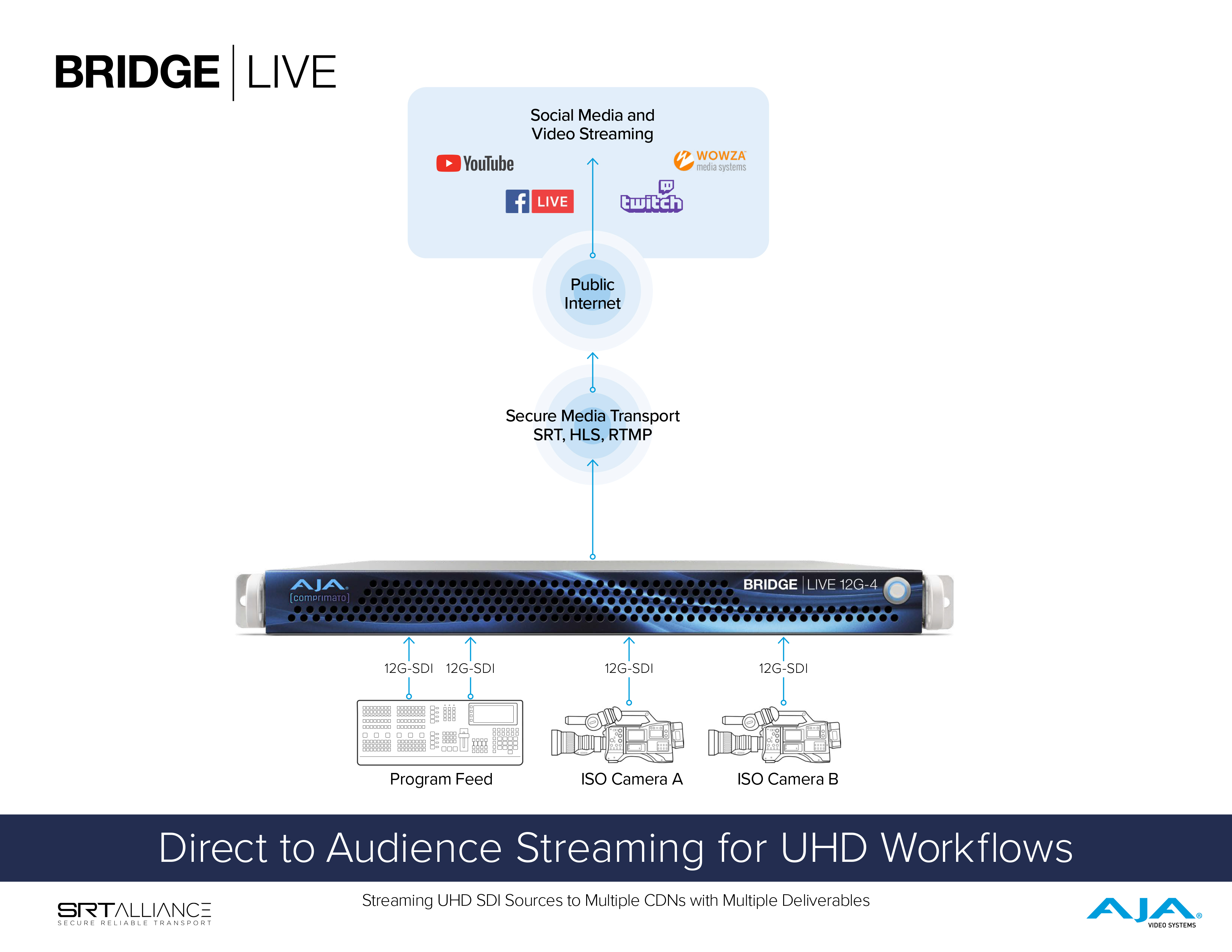
How many total SDI connections on BRIDGE LIVE?
Direct Link
Four full-size BNC connectors; all 12G/6G/3G-SDI capable.
Related Product: BRIDGE LIVE
How many total SDI encodes/decodes are supported with BRIDGE LIVE?
Direct Link
4x HD, 1x UltraHDp60, or 2x UltraHDp30. However, from a single SDI input, multiple output streams can be derived and/or destinations reached for delivery.
Related Product: BRIDGE LIVE
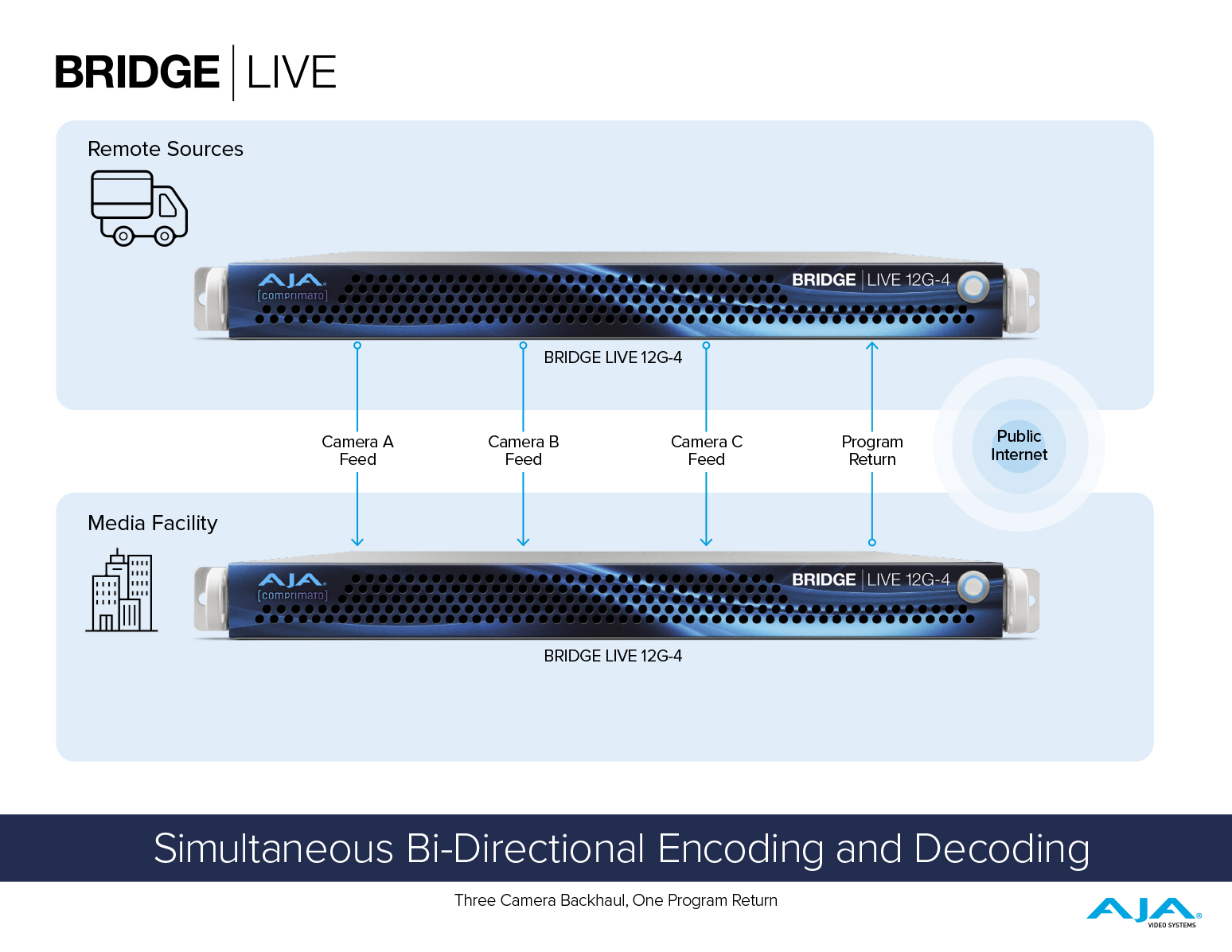
Can BRIDGE LIVE encode and decode SDI simultaneously?
Direct Link
For HD, combinations of 1 In + 3 Out, 3 Out + 1 In, 2 In + 2 Out, and of course 4 In or 4 Out are all possible.
Note: For UltraHDp60, BRIDGE LIVE can either be Inputting or Outputting SDI.
Related Product: BRIDGE LIVE
If I have an UltraHD source, can it be 12G-SDI, or must it be 4-wire?
Direct Link
UltraHD I/O must be single wire 12G-SDI. 4-wire UltraHD is not supported.
Related Product: BRIDGE LIVE
If present in the SDI input, can BRIDGE LIVE pass through OP42/47? Are there any caveats such as codec?
Direct Link
BRIDGE LIVE is able to pass-through many varieties of metadata (in accordance with SMPTE-2038). BRIDGE LIVE doesn’t explicitly recognize OP42, so no notification will take place. OP47 is not supported.
Related Product: BRIDGE LIVE
Does BRIDGE LIVE support Dolby-E? i.e., If it’s Dolby-E is embedded within the SDI feed (input), would that pass through?
Direct Link
Currently, BRIDGE LIVE does not support pass through of Dolby-E.
Related Product: BRIDGE LIVE
How many total 10GigE ports on BRIDGE LIVE?
When looking at the 10GigE ports from the rear of the chassis, which one is considered port 1 and which is considered port 2?
Direct Link
Port 1 is on the left. Port 2 is on the right.
Related Product: BRIDGE LIVE
Can more than one 10GigE Ports be given Admin duties?
Direct Link
Yes, this is available. A warning (not an error) will be received, since this is flagged as an atypical set up.
Related Product: BRIDGE LIVE
Is it possible to conduct an RTT ping with BRIDGE LIVE?
Direct Link
A22: BRIDGE LIVE runs on CentOS, so a basic Linux ping service is available on it, which can be used to conduct an RTT ping.
Related Product: BRIDGE LIVE
Often, 4 SDI inputs can be encoded to 3 different output streams (1080p, 720p, 480p, etc.). Could all of the output streams be 1080p? E.g., if you wanted to do 3 different language streams at 1080p, would that overtax the box, or could it handle it?
Direct Link
Yes, for workflows tested BRIDGE LIVE unit can handle 4x 1080p outputs. However, always be aware of how much CPU and GPU resources are being utilized. As a general rule, keep the CPU and GPU below 80% usage. There are multiple conditions that affect, resource utilization, such as; how many channels are running, what video processing is required, and codec used.
Related Product: BRIDGE LIVE
Is there a way to have a confidence monitor to see what your video looks like?
Direct Link
Yes, although not native within BRIDGE LIVE, an SDI monitor for SDI out and VLC, or some other software receiver for Streams. Additional details can be found in the manual.
Related Product: BRIDGE LIVE
What is the difference between adding a new Sink vs. adding a new Output Stream for SRT workflows? Is there any implication for system resources when using one over the other?
Direct Link
(i) Adding a new Sink takes advantage of the already encoded signal and enables easy replication of the output on a new IP, port, NIC, or even encapsulating it in SRT.
Example: For 10 remote clients who all want to view the same SRT stream, simply use “Configure Sinks” and within the same Pipeline – add sinks by bumping the port number for each additional remote client; E.g., client 1 – port 5051, client 2 – port 5052, and so on.
(ii) A new Output stream is used if the video configuration or bandwidth needs to vary between outputs.
Example: For 10 remote clients who all want to view the same SRT stream, but 5 of them want 20Mbps, and the other 5 need to use a lower quality, 8Mbps. In this case, we cannot only use “Configure Sinks” and different port numbers. We must create two separate output streams – one for 20Mbps and another for 8Mbps, and then again use the port numbers to provide 5 of each for the receiving clients.
(iii) Resource Utilization
There is no notable resource utilization differential between using Add Sink vs. Add Output Stream, where all settings are equal.
Related Product: BRIDGE LIVE
Does BRIDGE LIVE support RTMP / RTMPS?
Direct Link
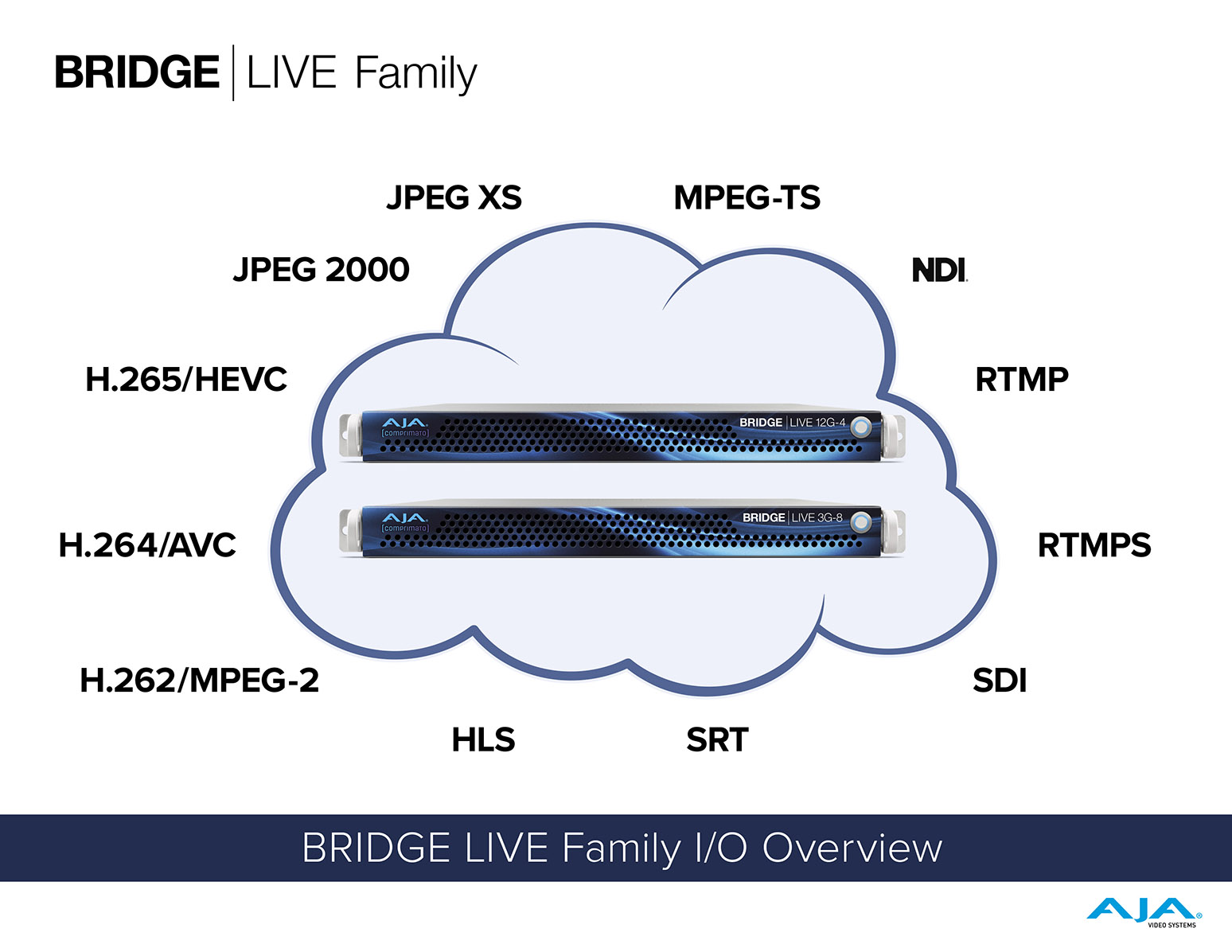
BRIDGE LIVE supports RTMP on input and output. RTMPS is only supported on output.
Related Product: BRIDGE LIVE
Does BRIDGE LIVE support 120 Hz input and output?
Direct Link
The support for 120Hz is there for stream support only. BRIDGE LIVE can receive a 120p stream and make 60p SDI out of it (halve the rate). There is currently no 120p SDI I/O planned.
Related Product: BRIDGE LIVE
Does BRIDGE LIVE support HLS?
Direct Link
Yes. Input support is across both AVC TS segments (for H.264) and Fragmented MP4 (for both H.265 and H.264). Output support is H.264 only.
Related Product: BRIDGE LIVE
Does BRIDGE LIVE support VBR?
Direct Link
Yes. Currently BRIDGE LIVE defaults to CBR for highest quality results. However, by loading the “low_latency.ini settings file” under “Advanced Setup”, you will now have access to a VBR setup. This can be used as is, or else edited to provide additional customization.
Related Product: BRIDGE LIVE
What is meant by latency?
Direct Link
Latency refers to the very slight delay between a signal entering BRIDGE LIVE and then leaving the system following any processing.
Related Product: BRIDGE LIVE
Is there an expected latency for BRIDGE LIVE?
Direct Link
Latency below 150ms is achievable, depending on processing and other factors.
Low latencies can most easily be achieved by loading the “low_latency.ini settings file” available under Advanced Setup. This will load a low latency preset which utilizes VBR instead of CBR.
Latency can be even more tightly optimized within the BRIDGE LIVE interface by tuning the system using custom .ini files that can be saved and loaded under Advanced Setup.
Related Product: BRIDGE LIVE
How is the latency presented in the BRIDGE LIVE GUI measured?
Direct Link
BRIDGE LIVE measures latency by comparing the time when a frame is received and when it is sent out. The reported latency in the UI is the difference between those two values.
• Specifically, BRIDGE LIVE measures from the first packet on input to the last packet on output. With SDI sources the whole frame is received at once, so the timer starts once the whole frame is available.
Related Product: BRIDGE LIVE
What is the difference between SRT Overhead vs. SRT Latency?
Direct Link
(i) The SRT Overhead parameter (SRT Output):
The amount over Total Bitrate that can be surpassed in order to recover lost data.
(ii) The SRT Latency parameter (ms) (SRT Input):
The time of intended delay of network packets (a buffer) that is allowed for the connection to slow down the data in transmission in order to provide a time slot to resend lost UDP packets if they occur.
(iii) If we combine that;
• SRT Overhead is a parameter that defines how much data can be used for retransmission.
• SRT Latency sets how long the receiver should wait for retransmissions.
SRT Overhead and Latency are also explained in the Manual.
Related Product: BRIDGE LIVE
What software is recommended for receiving from BRIDGE LIVE?
Direct Link
There are many software applications that can be used to receive the streaming output from BRIDGE LIVE. VLC player and vMix are a few examples.
Related Product: BRIDGE LIVE
What are the available frame rate conversion capabilities?
Direct Link
• Frame rate 50% down-conversion (e.g. 60p->30p, 59.94->29.97, 50p->25p)
• Frame rate 50% up-conversion (50i->50p)
Note: there is no support for Standards Conversion: e.g. 25->30, 50->60, 23.976->24.00, 59.94i->60p
Related Product: BRIDGE LIVE
What do Electronic Program Guide (EPG) and Interactive Program Guide on input mean?
Direct Link
Electronic Programming Guides and Interactive Programming Guides are menu-based systems that provide users of television, radio, and other media applications with continuously updated menus. These display scheduling information for current and upcoming broadcast programming. BRIDGE LIVE will take the information and pass it through as metadata.
Related Product: BRIDGE LIVE
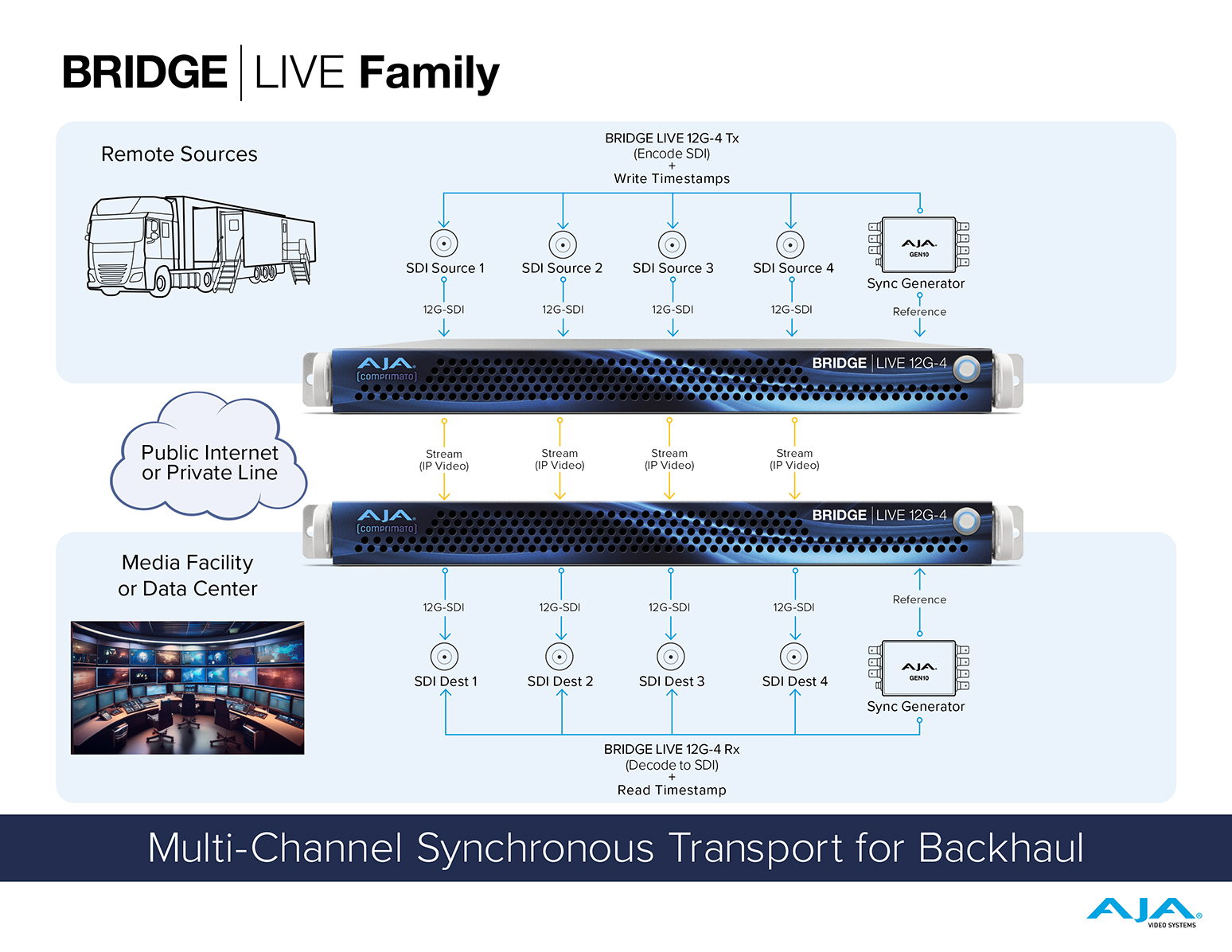
Can I get some help with a basic understanding of Synchronization?
Direct Link
Please refer to the BRIDGE LIVE Manual.
Related Product: BRIDGE LIVE
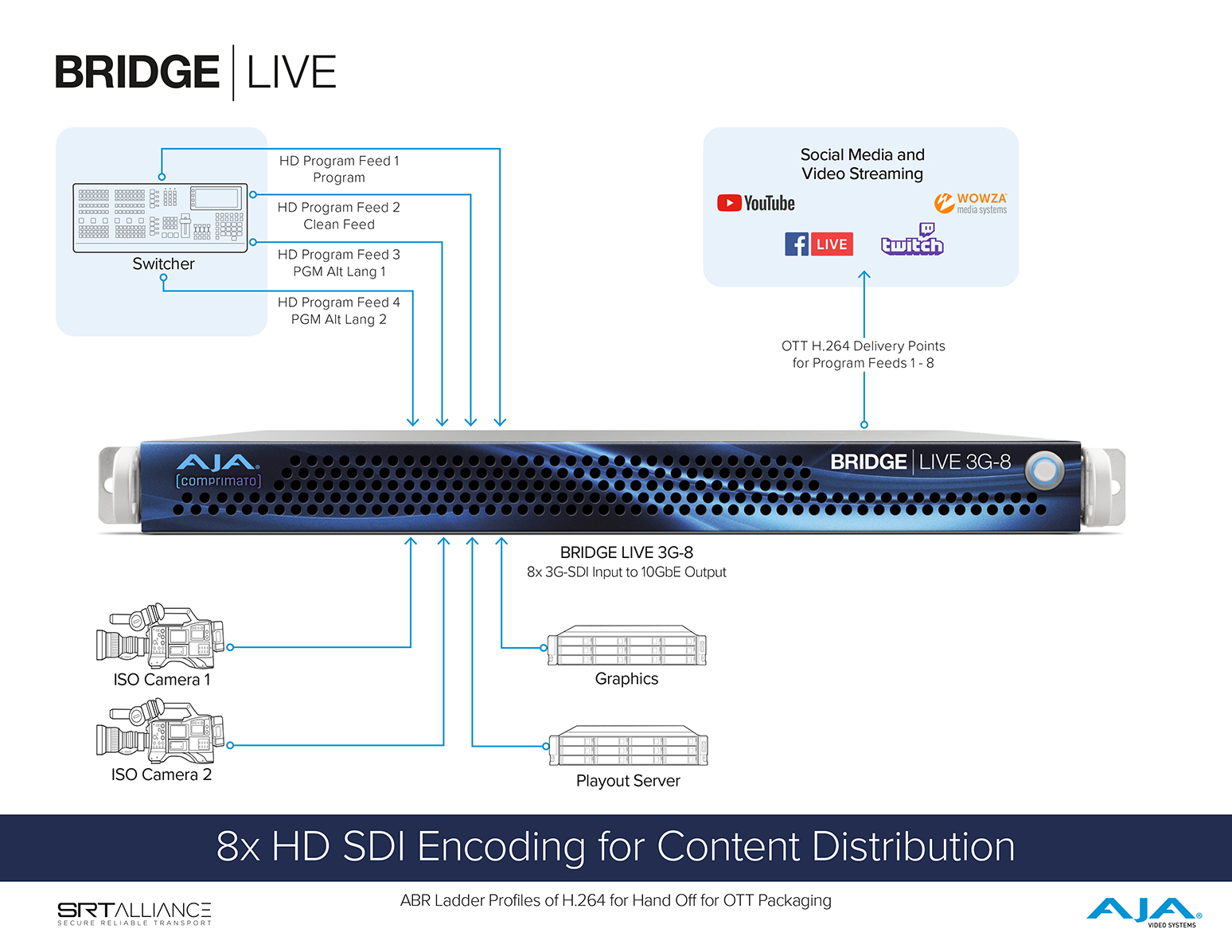
What packaging format(s) does BRIDGE LIVE support for ABR transcoding?
Direct Link
Currently, the format supported is RTMP (output only), which is used by some streaming services or CDNs. Other formats, such as HLS, DASH, or CMAF, are not supported at this time.
Related Product: BRIDGE LIVE
What does it mean that BRIDGE LIVE is able to prepare materials for hand-off to an OTT packaging service?
Direct Link
BRIDGE LIVE outputs streams in MPEG-TS format (with H.264 or HEVC inside), and those streams can be pointed to an external OTT packager (HLS or DASH).
• Often, customers prefer to have a separate packager since it is a resource intensive task.
Related Product: BRIDGE LIVE
How does the ABR (Adaptive Bitrate) process work?
Direct Link
ABR is a term used for the description of streaming technology where multiple variants of video are encoded. Each of the variants has different quality and/or resolution and bitrate. All the variants are described in a protocol-specific playlist, chunked to pieces, and published. An end-consumer is provided with a variant that best suits their connection. BRIDGE LIVE supports the encoding of multiple variants with different video quality by creating multiple output streams out of a single input stream. Other parts of ABR distribution have to be facilitated using an external packager (chunks TS output from transcoder and creates a playlist) or CDN (publishing to the internet).
Related Product: BRIDGE LIVE
Is there a simple step-by-step description of how to set up an ABR stream?
Direct Link
ABR ladder is basically a configuration of output streams, where each stream has different resolution and bitrate (potentially even quality, audio channels, etc.). So, in BRIDGE LIVE this is created as just a pipeline with multiple output streams. Provided the outputs are pointed to the right place, with the correct configuration, then this should do the trick for delivering to a packaging appliance/service.
For clarity then, there is no special type of output, it's just about the pipeline configuration.
Note: It is challenging to provide a recommended pipeline setup for ABR, since this is a deliverable requirement that may change from project to project.
Related Product: BRIDGE LIVE
What functionality does BRIDGE LIVE have regarding SCTE 104 and SCTE 35?
Direct Link
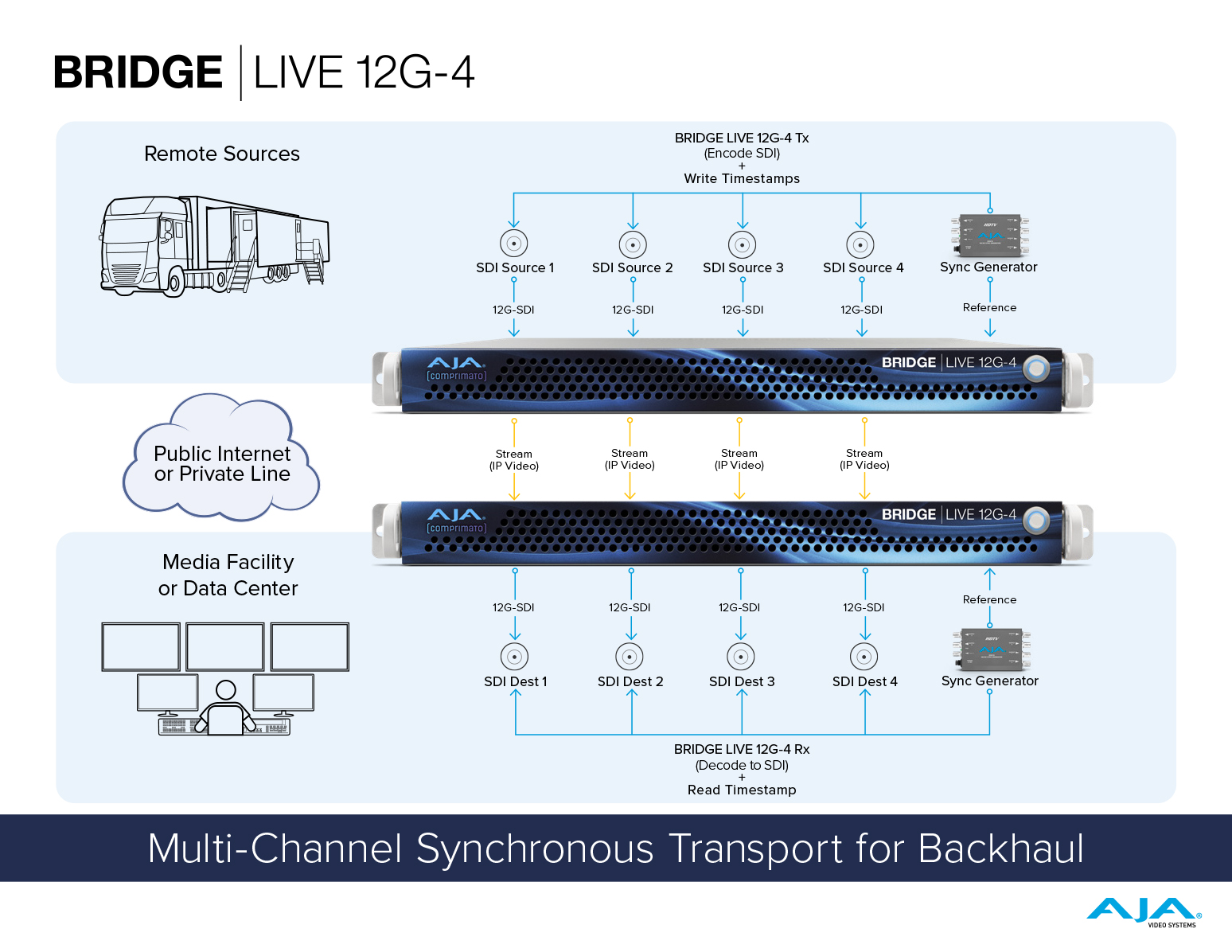
BRIDGE LIVE supports SCTE-104 to SCTE-35 conversion on the encoding end (i.e. taking SCTE-104 from the SDI source, converting it into SCTE-35 (the native format for TS), and then transmitting).
Since BRIDGE LIVE does not currently support SCTE 35 to SCTE-104 conversion on the receiving side, one workaround we can suggest today for a BRIDGE LIVE Tx to Bridge LIVE Rx scenario, is to transport SCTE 104 without conversion. That way it can be put back to SDI on the receiving end. However, this might not be supported by receivers other than BRIDGE LIVE.
Related Product: BRIDGE LIVE
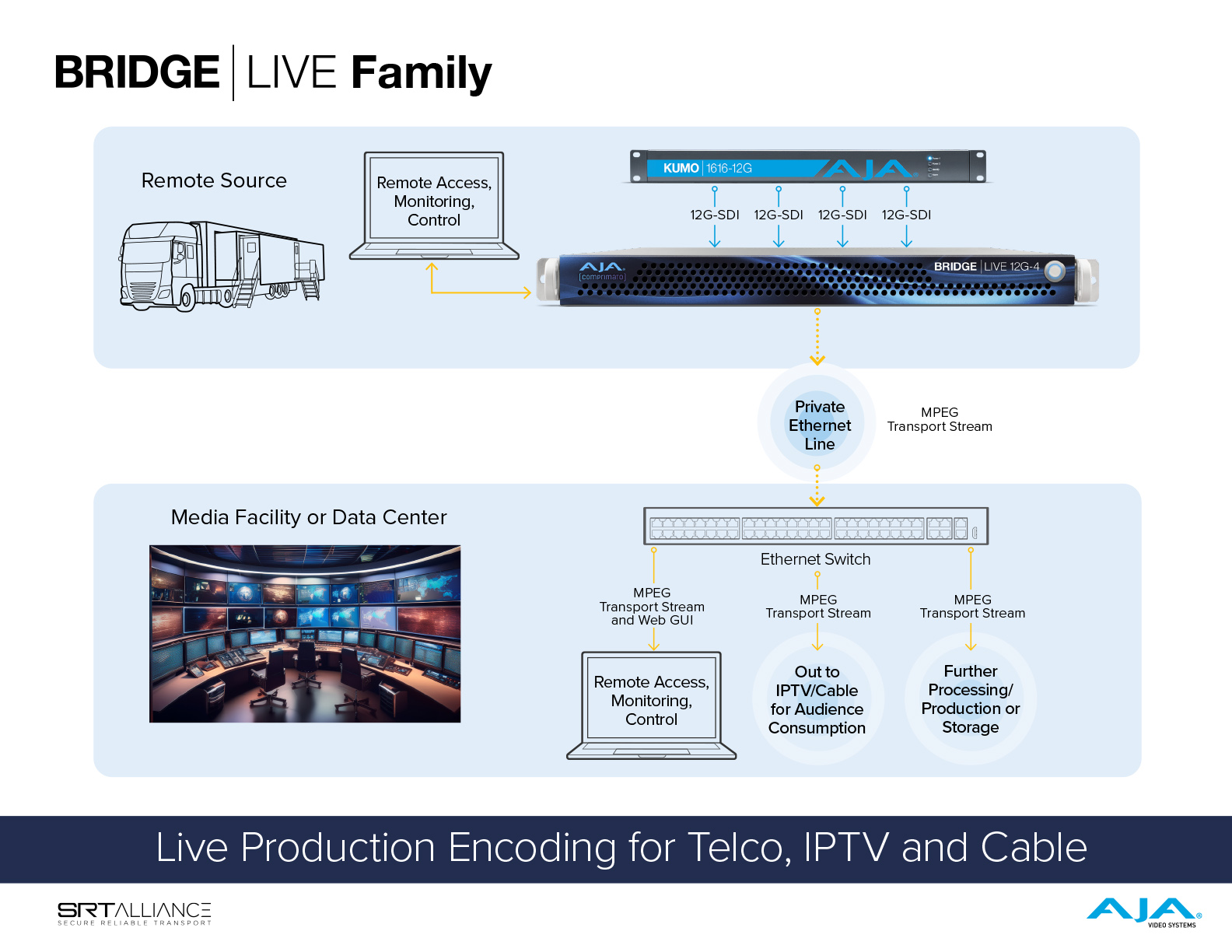
Why is MPTS (Multi-Program Transport Stream) only supported on input?
Direct Link
MPTS (Multi-Program Transport Stream) is supported only on input because it is a fairly easy to read MPTS individual program, while it is fairly complex to multiplex a number of SPTS (Single-Program Transport Stream) into the MPTS output. Plus, there are specialized devices for that purpose.
Related Product: BRIDGE LIVE
Will BRIDGE LIVE be offering the product with multiple GPUs?
Direct Link
No, this model is a turnkey system with a single GPU.
Related Product: BRIDGE LIVE
Does BRIDGE LIVE have scheduling for place such as a House of Worship so they can be hands-free?
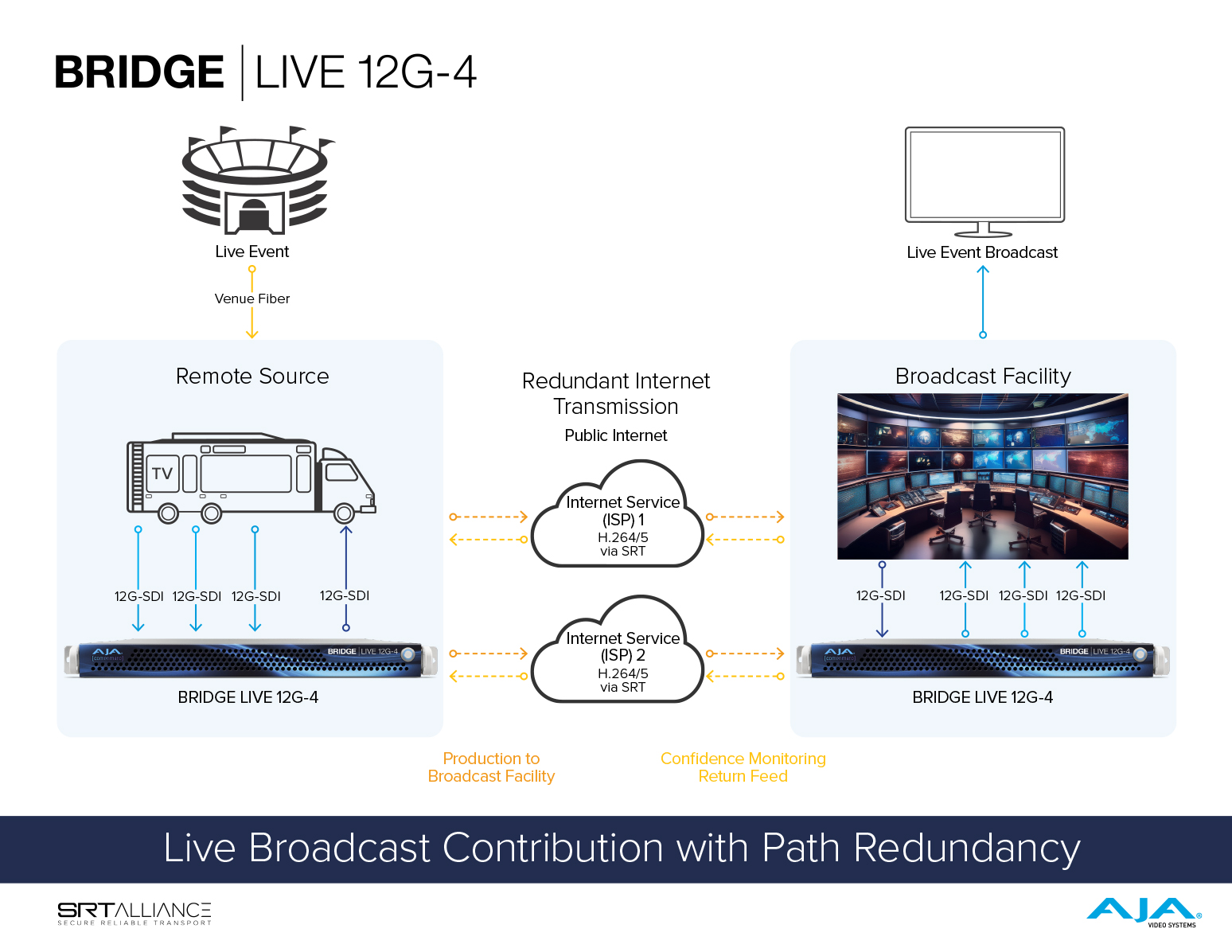
How does redundancy work?
Direct Link
BRIDGE LIVE duplicates the RTP packets out of both NICs. The receiving BRIDGE LIVE performs a packet by packet comparison of the incoming signals and utilizes the packet that responds first and the originating signal quality is maintained.
Related Product: BRIDGE LIVE
Why does the logo inserter sometimes output a blocky edge?
Direct Link
Try using a 500 pixel image instead of 1000 or above to remove blocky edges. If this does not work, it will be a function of the (a) codec, (b) quality settings, and (c) the encode/decode difficulty of the video. For example, suddenly fast moving high dynamic range content may produce this result with the logo on occasion.
Related Product: BRIDGE LIVE
When a logo is inserted, will it be inserted to all ABR profiles of the transcoder?
Direct Link
No, it will be inserted only for the output stream it was uploaded in. However, the logo will be available for all other output streams in the drop-down menu, so you can choose which outputs will get the logo and which will not. E.g. for internet streaming, you want to include the logo, but you don’t want the logo for another output created for remote production purposes.
Related Product: BRIDGE LIVE
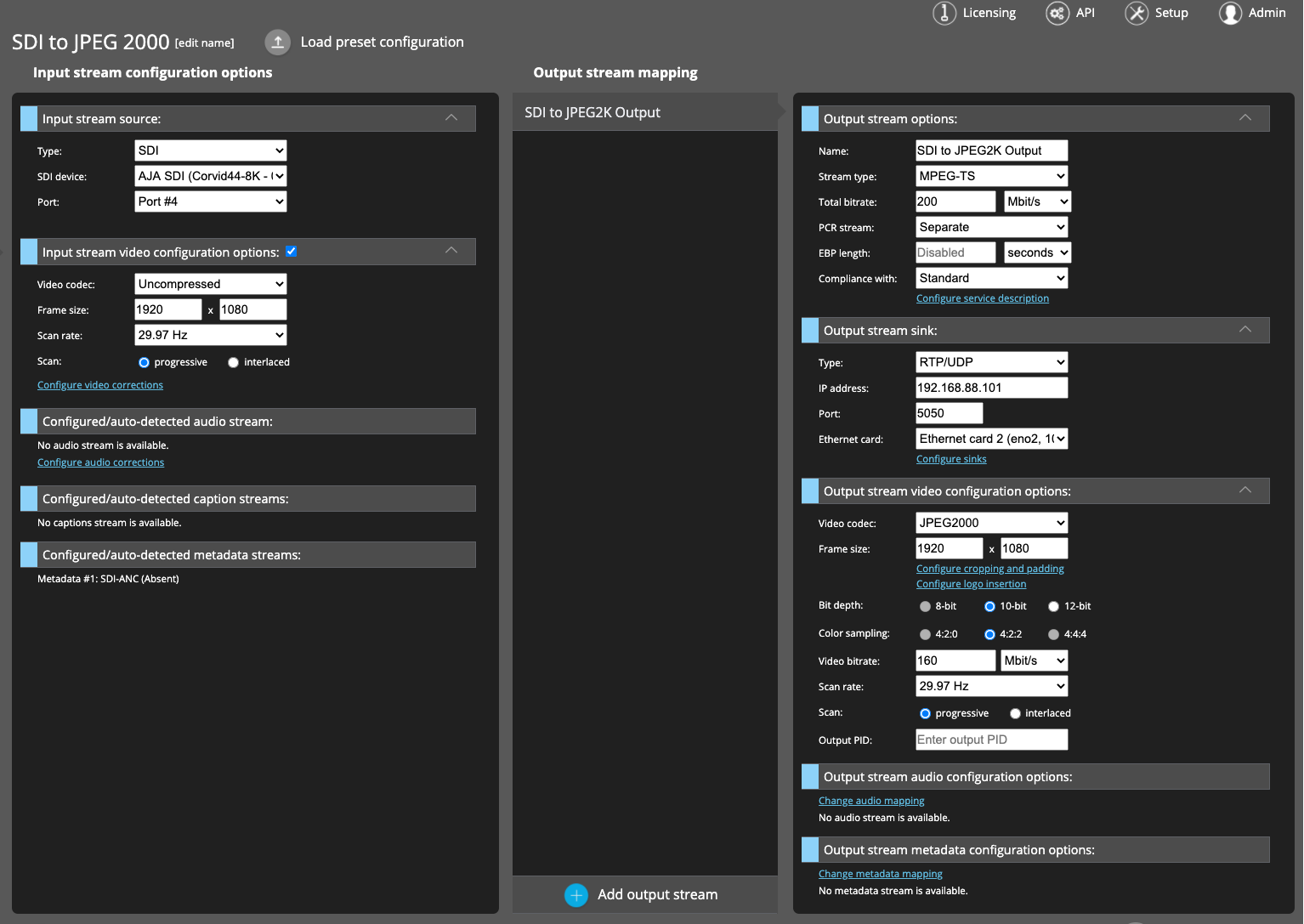
Is it possible to use AJA IPR-1G-SDI or IPR-1G-HDMI to receive JPEG 2000 streams from BRIDGE LIVE?
Direct Link
The (now EOL) IPR-1G devices were created several years ago, with different specifications, workflows, and customers in mind.
Related Product: BRIDGE LIVE
Does BRIDGE LIVE support using all three display ports from the NVIDIA card (cloned screen), or would this cause unnecessary taxing of the GPU?
Direct Link
BRIDGE LIVE does support using all three display ports from the NVIDIA card, which would result in a cloned screen. There is no unnecessary taxing on the GPU.
Related Product: BRIDGE LIVE
 Mini-Converters
 Digital Recorders
 Mobile I/O
 Desktop I/O
 Color
Color
 Streaming
 IP Video/Audio
 Frame Sync
 openGear
 Routers
 Recording Media
 Developer
 Software




























 Contact Support
 Register Your Product