Tech Specs
Tech Specs are subject to change.
Video Formats
• (HD) 1080i 25, 29.97, 30
• (HD) 1080PsF 23.98, 24
• (HD) 720p 50, 59.94, 60
• (SD) 625i 25
• (SD) 525i 29.97
|
Input
|
Possible Output Formats
|
|
525i59.94
|
525i59.94
|
720p59.94
|
1080i59.94
|
|
720p59.94
|
525i59.94
|
720p59.94
|
1080i59.94
|
|
1080i59.94
|
525i59.94
|
720p59.94
|
1080i59.94
|
|
|
|
1080pSF23.98
|
1080pSF23.98
|
1080i59.94
|
525i59.94
|
|
|
|
625i50
|
625i50
|
1080i50
|
720p50
|
|
720p50
|
625i50
|
1080i50
|
720p50
|
|
1080i50
|
625i50
|
1080i50
|
720p50
|
|
|
|
1080pSF24
|
1080pSF24
|
1080i60
|
|
|
1080i60
|
1080i60
|
720p60
|
|
|
720p60
|
720p60
|
1080i60
|
|
Notes:
• In the case of 1080pSF 23.98 input - and when 1080i 59.94 (or 525) is selected as an output format, the FS1 automatically does 3:2 pulldown to get the correct frame rate.
• When passing 24 or 60 frame rate video, output is high definition.
Video Input Digital
• Dual SD/HD SDI, SMPTE-259/292/296, 8 or 10-bits
• Single Link 4:2:2 (1 x BNC each)
Video Input Analog
• HD component YPbPr, SMPTE-274 (3 x BNC)
• 12-bit A/D, 2 x oversampling
• SD Component (3 x BNC)
• SMPTE/EBU N10, Betacam 525 line, Betacam 525J
• 12-bit A/D, 4 x oversampling
• +/- .25 dB to 5.5 mHz Y frequency response
• +/- .25 dB to 2.5 mHz C frequency response
• .5% 2T pulse response
• <2 ns Y/C delay inequity
• SD Composite/YC (S-Video)
• 12-bit A/D, 4 x oversampling
Video Output Digital
• Dual SD/HD SDI, SMPTE-259/292/296, 8 or 10-bits
• Single Link 4:2:2 (1 x BNC each)
Video Output Analog
• HD component YPbPr/RGB, SMPTE-274 (3 x BNC)
• 12-bit D/A, 2 x oversampling
• SD Component (3 x BNC)
• SMPTE/EBU N10, Betacam 525 line, Betacam 525J
• 12-bit D/A, 4 x oversampling
• +/- .25 dB to 5.5 mHz Y frequency response
• +/- .25 dB to 2.5 mHz C frequency response
• .5% 2T pulse response
• <2 ns Y/C delay inequity
• SD Composite/YC (S-Video)
• 12-bit D/A, 4 x oversampling
Audio Input Digital
• 16-Channel, 24-bit SMPTE-259 SDI embedded audio, 48 kHz sample rate, synchronous
• 8-Channel, 24-bit AES/EBU audio, 48 kHz sample rate, synchronous or nonsynchronous, internal sample rate conversion (4 x BNC)
Audio Input Analog
• 8-Channel, 24-bit A/D analog audio, 48 kHz sample rate, balanced (8 x XLR via 25-pin breakout cable)
• +12dBu, +15dBU, +18dBu, +24dBu (Full Scale Digital)
• +/- 0.2db 20 to 20 kHz frequency response
Audio Output Digital
• 16-Channel, 24-bit SMPTE-259 SDI embedded audio, 48 kHz sample rate, synchronous
• 8-Channel, 24-bit AES/EBU audio, 48 kHz sample rate, synchronous or nonsynchronous, internal sample rate conversion (4 x BNC)
Audio Output Analog
• 8-Channel, 24-bit D/A analog audio, 48 kHz sample rate, balanced (8 x XLR via 25-pin breakout cable)
• +12dBu, +15dBU, +18dBu, +24dBu (Full Scale Digital)
• +/- 0.2db 20 to 20 kHz frequency response
Up-Conversion
• Hardware 10-bit
• Anamorphic: fullscreen
• Pillarbox 4:3: results in a 4:3 image in center of screen with black sidebars
• Zoom 14:9: results in a 4:3 image zoomed slightly to fill a 14:9 image with black side bars
• Zoom Letterbox: results in image zoomed to fill full screen
• Zoom Wide: results in a combination of zoom and horizontal stretch to fill a 16:9 screen; this setting can introduce a small aspect ratio change
Down-Conversion
• Hardware 10-bit
• Anamorphic: fullscreen
• Letterbox: image is reduced with black top and bottom added to image area with the aspect ratio preserved
• Crop: image is cropped to fit new screen size
Cross-Conversion
• Hardware 10-bit
• 1080i to 720P
• 720p to 1080i
• 720p to 1080PsF
SD to SD Aspect Ratio Conversion
• Letterbox: This transforms SD anamorphic material to a letterboxed image
• H Crop: Will produce a horizontally stretched effect on the image; transforms anamorphic SD to full frame
• SD Pillarbox: Will produce an image in the center of the screen with black borders on the left and right sides and an anamorphized image in the center
• V Crop: Will transform SD letterbox material to an anamorphic image
Timecode
Reference Input
• Analog Color Black (1V) or Composite Sync (2 or 4V)
• Looping, nonterminating
Network Interface
• 10/100 Ethernet (RJ-45)
• Embedded web server for remote control
• VTECS™ protocol for Remote Control Panel
User Interface
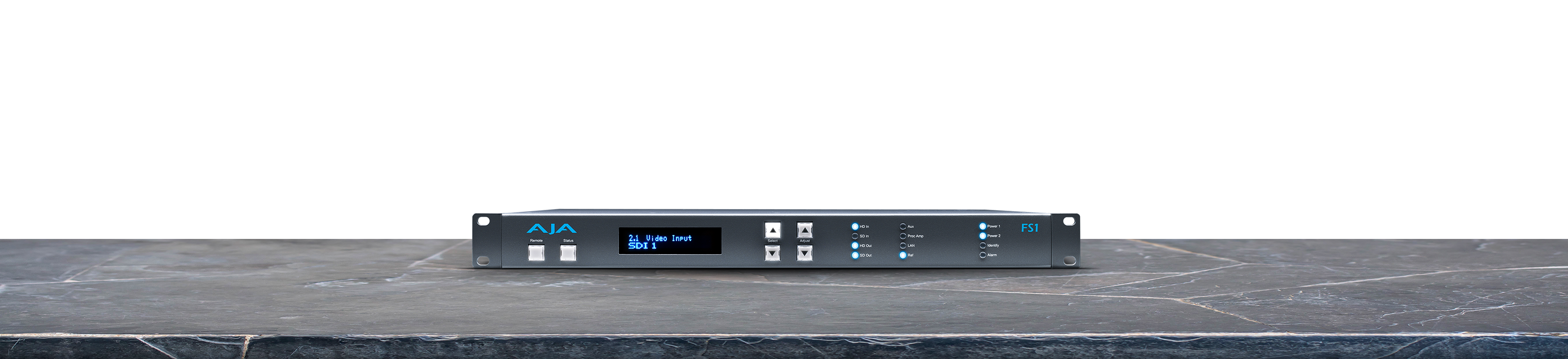
• Alphanumeric display, with dedicated buttons
Machine Control
• GPI in/out, 9-pin D-connector
• Pinout is as follows:
|
1
|
GPI IN 1
|
|
2
|
GPI IN 2-
|
|
3
|
GPI OUT 1
|
|
4
|
GPI OUT 2
|
|
5
|
Chassis Ground
|
|
6
|
I/O GROUND 1
|
|
7
|
I/O GROUND 2
|
|
8
|
I/O GROUND 1-
|
|
9
|
I/O GROUND 1
|
• RS-422, Sony 9-pin protocol (reserved for future use)
• 9-pin D-connector pinout is as follows:
|
1
|
GND
|
|
2
|
RX-
|
|
3
|
TX+
|
|
4
|
GND
|
|
5
|
No Connection
|
|
6
|
GND
|
|
7
|
RX+
|
|
8
|
TX-
|
|
9
|
GND
|
|
Shell
|
GND
|
Size (w x d x h)
17.25" x 12.5" x 1.75" iRU (438.1mm x 317.5mm x 44.4mm)
Weight
Power
• 100-240 VAC 50/60 Hz (Dual, redundant power supplies), 25W typical; 30W max.
Environment
• Safe Operating Temperature: 0 to 40 degrees C (32 to 104 degrees F)
• Safe Storage Temperature (Power OFF): -40 to 60 degrees C (-40 to 140 degrees F)
• Operating Relative Humidity: 10-90% noncondensing
• Operating Altitude: <3,000 meters (<10,000 feet)
 Mini-Converters
 Digital Recorders
 Mobile I/O
 Desktop I/O
 Color
Color
 Streaming
 IP Video/Audio
 Frame Sync
 openGear
 Routers
 Recording Media
 Developer
 Software


















 Contact Support
 Register Your Product